MaClipHistory is now a native Swift clipboard history app
MaClipHistory has a new native macOS build.
The app has been rebuilt with Swift, SwiftUI, and AppKit so it can feel smaller, faster, and more at home in the macOS menu bar.
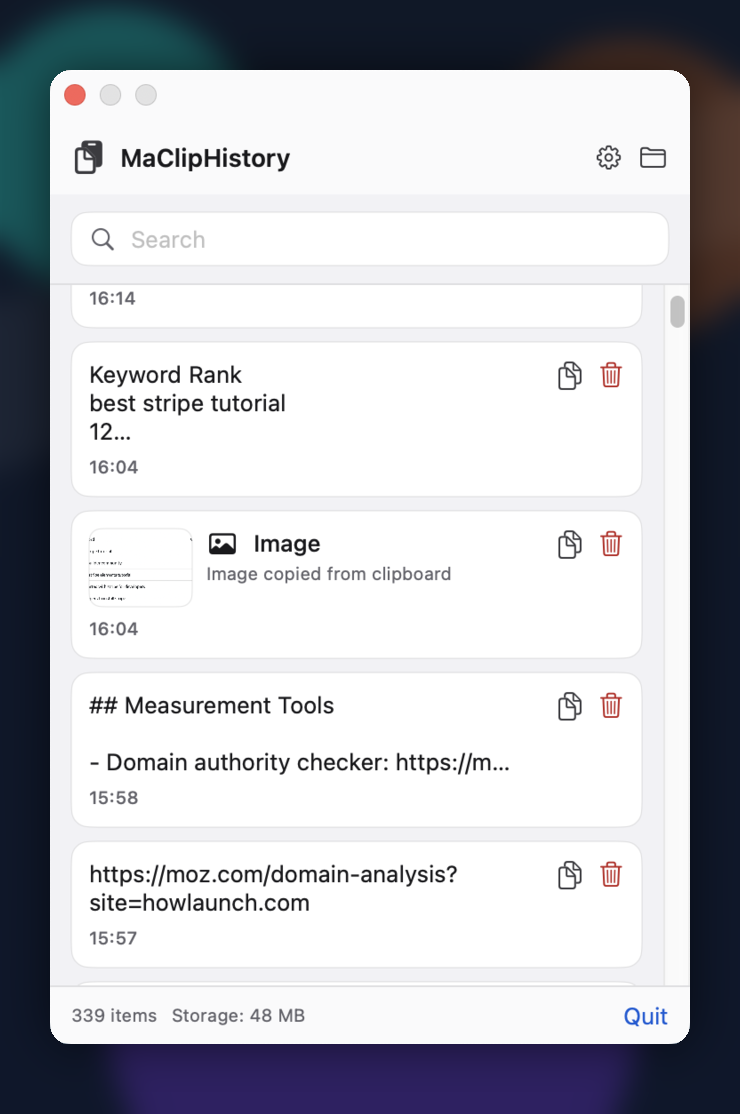
What changed
The new native build focuses on a lighter everyday clipboard workflow. It runs as a menu bar accessory, opens with Command + Shift + V, and stores clipboard history locally in Application Support.
It also adds local support for more than text. MaClipHistory can now monitor text, images, GIFs, and small files, using sidecar storage for media and file items instead of pushing your clipboard into a cloud account.
The popover is designed to stay available across macOS Spaces and full-screen apps. If you swipe between desktops or full-screen windows, MaClipHistory can still appear on top of the current workspace so you can pick a clip without breaking your flow.
New native features
- Native menu bar app: Built with Swift, SwiftUI, and AppKit for macOS.
- Global shortcut: Open or hide clipboard history with
Command + Shift + V. - Text search: Filter copied text quickly from the popover.
- Media and file history: Keep text, images, GIFs, and small files locally.
- Works across Spaces: Show clipboard history over the current macOS Space or full-screen app, so you can swipe between workspaces and keep the picker available.
- Local storage: Clipboard data is saved on your Mac in Application Support.
- Simple controls: Copy, delete, clear history, reveal storage in Finder, and quit from the app.
- Native settings: Adjust theme, history length, and file capture size.
Compatibility
The current native community build is version 0.1.0 for Apple Silicon Macs running macOS 13.0 or later.
This build is ad-hoc signed and not notarized by Apple yet, so macOS may ask you to right-click Open or remove the quarantine flag after installation.
Download
Download the native Swift build and try the new lighter MaClipHistory workflow.
Try MaClipHistory Today
Experience the power of a truly private clipboard manager
Download Now - It's Free